EVK2 Driver Installation
If you own an EVK2 or an RDK2, you will need to install the driver manually on Windows OS.
First, download wdi-simple.exe from our file server.
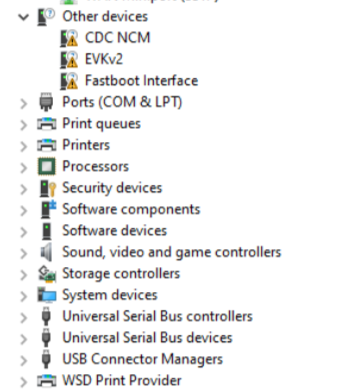
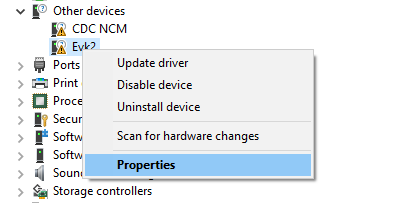
Then, verify in your device manager that you have the three following interfaces when your camera is connected: CDC NCM; EVK2; fastboot, displayed as below with a warning sign
(from left to right, picture 1). If not, uninstall the device already installed as shown in picture 2 and 3
(generally the already installed device is, either EVK2 if you connect an EVK2 device or fastboot if you connect an RDK2 device).
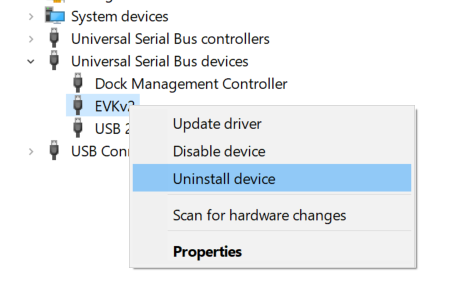
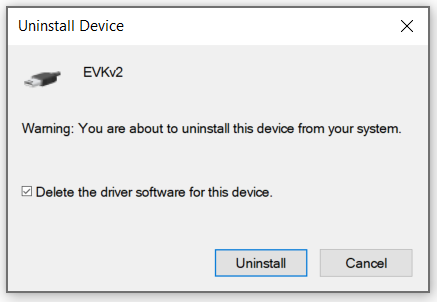
Kindly note that you should repeat this uninstall operation until your device (EVK2/fastboot) is not recognized anymore and appears in other devices with a warning sign.
Now, you should install the relevant driver for each of the three interfaces (EVKv2, CDC-NCM and FastbootInterface).
To do so, follow those steps for each interface:
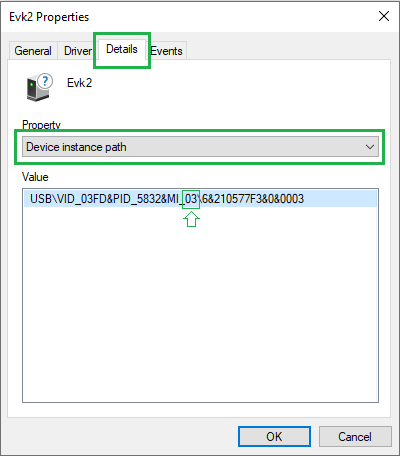
find out the name of interface by checking the Device Manager as shown in the picture below:
For example, we can see on the right picture that the interface number is
03.install the relevant driver with the following command launched as an administrator:
wdi-simple.exe -n "EVK" -m "Prophesee" -v 0x03fd -p 0x5832 -i <INTERFACE_NUMBER>